 Diep Dao
Databases: Storing and Querying Data at Scale
This is Post 7 in the Computer Science Series. The previous post covered networks and security. Now we look at databases — how we store, organize, and query data reliably at scale.
Databases are everywhere: your social media profile, your bank balance, every product in an online store, every message you’ve ever sent. A database is not just a fancy file — it’s a system that guarantees data survives crashes, multiple users can work at once without corrupting each other’s data, and you can find anything in milliseconds.
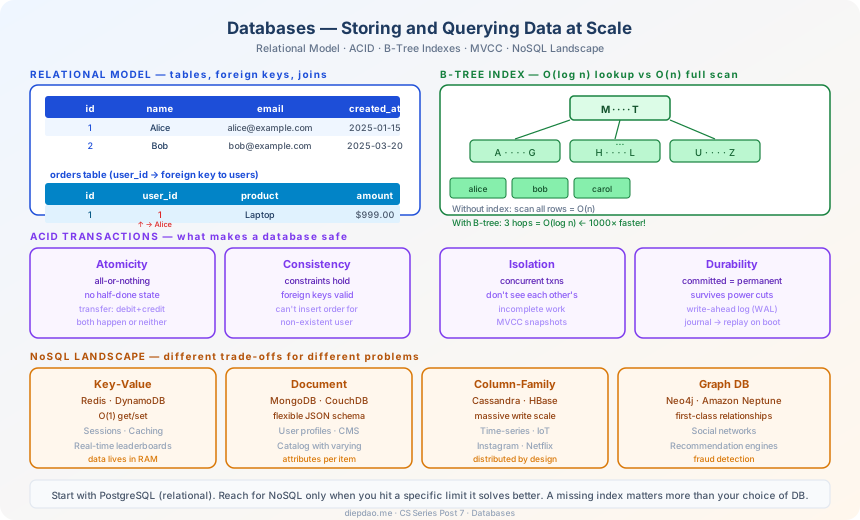
The Big Picture
╔══════════════════════════════════════════════════════════════════════════════╗
║                          Database Landscape                                   ║
╠══════════════════════════════════════════════════════════════════════════════╣
║                                                                               ║
║  Relational (SQL)            NoSQL                                            ║
║  ─────────────────────       ──────────────────────────────────────────────   ║
║  PostgreSQL, MySQL,          Key-Value:  Redis, DynamoDB                      ║
║  SQLite, Oracle              Document:   MongoDB, CouchDB                     ║
║                              Column:     Cassandra, HBase                     ║
║  ACID guaranteed             Graph:      Neo4j, Amazon Neptune                ║
║  Strong consistency          Time-series: InfluxDB, TimescaleDB               ║
║  Joins across tables         Search:     Elasticsearch                        ║
║                                                                               ║
╠══════════════════════════════════════════════════════════════════════════════╣
║  Key Concepts                                                                 ║
║                                                                               ║
║  ACID:     Atomicity · Consistency · Isolation · Durability                   ║
║  Indexes:  B-tree, hash — fast queries without scanning everything            ║
║  MVCC:     multiple versions of data → reads don't block writes               ║
║  Sharding: split data across machines → horizontal scale                      ║
╚══════════════════════════════════════════════════════════════════════════════╝
1. Why Not Just Use Files?
Files are simple but fragile:
- Crash: you write half a record when power cuts out. File is corrupt.
- Concurrency: two users update the same row simultaneously. One update is lost.
- Performance: to find one user in a 10 million line file, you read every line.
- Relationships: to link a user to their orders and items, you’d manually join files.
A database solves all of these. It’s a lot of engineering — B-trees, write-ahead logs, locking mechanisms — but it’s engineering you benefit from without writing yourself.
2. The Relational Model — Tables and SQL
The relational model organises data into tables (relations). Each table has rows (records) and columns (attributes).
users table:
┌────┬──────────┬───────────────────┬──────────────┐
│ id │ name     │ email             │ created_at   │
├────┼──────────┼───────────────────┼──────────────┤
│  1 │ Alice    │ alice@example.com │ 2025-01-15   │
│  2 │ Bob      │ bob@example.com   │ 2025-03-20   │
│  3 │ Carol    │ carol@example.com │ 2025-06-01   │
└────┴──────────┴───────────────────┴──────────────┘

orders table:
┌────┬─────────┬──────────┬────────┐
│ id │ user_id │ product  │ amount │
├────┼─────────┼──────────┼────────┤
│  1 │       1 │ Laptop   │ 999.00 │
│  2 │       1 │ Mouse    │  29.00 │
│  3 │       2 │ Monitor  │ 399.00 │
└────┴─────────┴──────────┴────────┘
user_id in orders is a foreign key — it references the id in users. This link lets you join tables.
SQL — Talking to the Database
SQL (Structured Query Language) is the standard language for relational databases.
-- Find all orders by Alice with their products
SELECT users.name, orders.product, orders.amount
FROM users
JOIN orders ON users.id = orders.user_id
WHERE users.name = 'Alice';

-- Result:
-- Alice | Laptop | 999.00
-- Alice | Mouse  |  29.00

-- Sum of all orders per user
SELECT users.name, SUM(orders.amount) AS total
FROM users
JOIN orders ON users.id = orders.user_id
GROUP BY users.name
ORDER BY total DESC;
SQL is declarative — you describe what you want, not how to find it. The database’s query optimizer figures out the best execution plan.
3. ACID — The Four Guarantees
What separates a database from a file is ACID transactions:
Atomicity
A transaction either fully succeeds or fully fails — no partial state.
-- Transfer $100 from Alice to Bob
BEGIN;
UPDATE accounts SET balance = balance - 100 WHERE user_id = 1;  -- Alice
UPDATE accounts SET balance = balance + 100 WHERE user_id = 2;  -- Bob
COMMIT;
If the server crashes between the two UPDATEs, when it restarts, neither update applies. Alice doesn’t lose money without Bob gaining it.
Consistency
A transaction moves the database from one valid state to another. Constraints (foreign keys, unique columns, check constraints) are enforced.
INSERT INTO orders (user_id, product) VALUES (999, 'Laptop');
-- Fails! user_id 999 doesn't exist in users table.
-- The database enforces referential integrity.
Isolation
Concurrent transactions don’t see each other’s incomplete work.
Transaction A:                   Transaction B:
READ balance → 100              (happening at same time)
                                 READ balance → 100
                                 WRITE balance = 100 + 50 = 150
WRITE balance = 100 - 30 = 70
-- Without isolation: both read 100, one update is lost
-- With isolation: one goes first, the other sees the updated value
Durability
Once committed, data is permanently saved — even if the server crashes immediately after.
How? Write-Ahead Logging (WAL): before modifying data, write what you’re about to do to a log on disk. After a crash, replay the log. No committed data is ever lost.
4. Indexes — Finding Data Fast
Without an index, finding a row is a full table scan: check every row until you find it. O(n).
SELECT * FROM users WHERE email = 'alice@example.com';
-- Without index: scan all 10 million rows
-- With index: 2-3 lookups, regardless of table size → O(log n)
An index is a separate data structure (usually a B-tree) that maps column values to row locations.
B-Tree Index
A B-tree is a balanced tree where each node holds multiple keys and pointers.
B-tree on users.email:

               [H ... P]
              /          \
     [A ... G]            [Q ... Z]
    /    |    \           /    |    \
 [A-C] [D-F] [G]       [Q-S] [T-V] [W-Z]
To find alice@example.com: start at root, compare, go left, compare, find it. O(log n) for any table size.
Which columns to index:
- Columns in
WHEREclauses you frequently filter on - Columns in
JOINconditions - Columns in
ORDER BYclauses
Cost: indexes speed up reads but slow down writes (the index must be updated on every insert/update/delete).
-- Add an index:
CREATE INDEX idx_users_email ON users(email);

-- Now this is fast:
SELECT * FROM users WHERE email = 'alice@example.com';
A missing index can make a query 1,000× slower. Reading a query’s execution plan shows whether it’s using an index or scanning the whole table:
EXPLAIN SELECT * FROM users WHERE email = 'alice@example.com';
-- Index Scan on idx_users_email → fast!
-- Seq Scan (sequential scan) → slow, probably needs an index
5. MVCC — Reads and Writes Together
How can a long-running report query read data while others are constantly updating it, without conflicts?
MVCC (Multi-Version Concurrency Control) keeps multiple versions of each row:
Row (user_id=1, balance=100)
   ← created at time 10, visible to transactions after time 10

Row (user_id=1, balance=70)
   ← created at time 15, visible to transactions after time 15
When your report query starts at time 12, it sees the balance as 100 (even if someone updates it to 70 at time 15). Your query gets a consistent snapshot of the entire database at its start time.
No read locks needed. Readers and writers don’t block each other. This is why PostgreSQL can handle thousands of concurrent users efficiently.
6. NoSQL — When Relational Isn’t the Right Tool
The relational model is powerful but not always the best fit.
Key-Value Stores (Redis, DynamoDB)
Simplest model: map a key to a value.
SET session:user_123   "{name: Alice, cart: [...]}"
GET session:user_123   → "{name: Alice, ...}"
Extremely fast (Redis stores everything in RAM). Used for: session storage, caches, real-time leaderboards.
Document Stores (MongoDB)
Store JSON documents. No fixed schema — different documents can have different fields.
{
  "_id": "user_123",
  "name": "Alice",
  "address": {
    "city": "Singapore",
    "country": "SG"
  },
  "tags": ["premium", "newsletter"]
}
Good for: content management systems, user profiles, products with varying attributes. Bad for: complex joins across collections.
Column-Family Stores (Cassandra)
Designed for massive write throughput across many machines. Used by Instagram, Netflix.
Data is organized by a partition key — all rows with the same key live on the same machine. Queries that respect partition keys are fast; those that don’t are slow.
Graph Databases (Neo4j)
First-class support for relationships. Querying “friends of friends who like jazz” is 1 line in Cypher (Neo4j’s query language) but an ugly recursive SQL query.
When to Use What
| Use case | Best choice |
|---|---|
| General-purpose app data | PostgreSQL (SQL) |
| Sessions, caches, real-time data | Redis |
| Flexible schemas, document collections | MongoDB |
| Massive write scale, time-series | Cassandra |
| Social graphs, recommendation engines | Neo4j |
| Search (full-text) | Elasticsearch |
Start with a relational database. Reach for NoSQL when you have a specific problem it solves better.
7. Scaling a Database
As traffic grows, a single database server becomes a bottleneck.
Read Replicas
Copy the primary database to one or more replicas. Direct read queries to replicas, writes to the primary.
Writes → Primary DB
Reads  → Replica 1, Replica 2, Replica 3 (3× read throughput)
Trade-off: replicas are slightly behind the primary (replication lag). Reads might see slightly stale data.
Sharding — Horizontal Partitioning
Split the data across multiple databases by a shard key.
Users with ID 1–1M       → Shard 1
Users with ID 1M–2M      → Shard 2
Users with ID 2M–3M      → Shard 3
Now each shard handles 1/3 of the writes and 1/3 of the data. Scales linearly.
Complication: queries that need data from multiple shards (JOINs across shards) become very hard. Sharding is a last resort — exhaust other options first.
Caching
Put a fast cache (Redis) in front of the database:
Request → Redis cache
  → hit:  return cached data (0 ms)
  → miss: query database, store in Redis, return result
80% of database load is often the same 20% of data. Caching that 20% can reduce database load by 4×.
Summary
A database is more than storage. It’s a system that guarantees:
Atomicity    → transactions fully succeed or fully fail
Consistency  → constraints always hold
Isolation    → concurrent transactions don't interfere
Durability   → committed data survives crashes

Indexes      → find any row in O(log n) regardless of table size
MVCC         → reads and writes don't block each other
Replication  → read scale and fault tolerance
Sharding     → write scale
Choosing the right database and designing the right schema and indexes are among the highest-leverage decisions in building a production system. A bad choice shows up as slow queries, data corruption, or scaling walls — often months after launch.
In the next post, we’ll look at Application Development — how to design APIs, structure code, test it, and ship it reliably.
Back to the series: Welcome to the Computer Science Series
Comments