 Diep Dao
Application Development: Building Software That Lasts
This is Post 8 in the Computer Science Series. The previous post covered databases. Now we look at application development — the craft of building software that actually works, is maintainable, and doesn’t collapse under pressure.
Writing code that works once is easy. Writing code that works reliably for years, maintained by a team, is genuinely hard. This post covers the ideas and practices that separate hobby projects from production software.
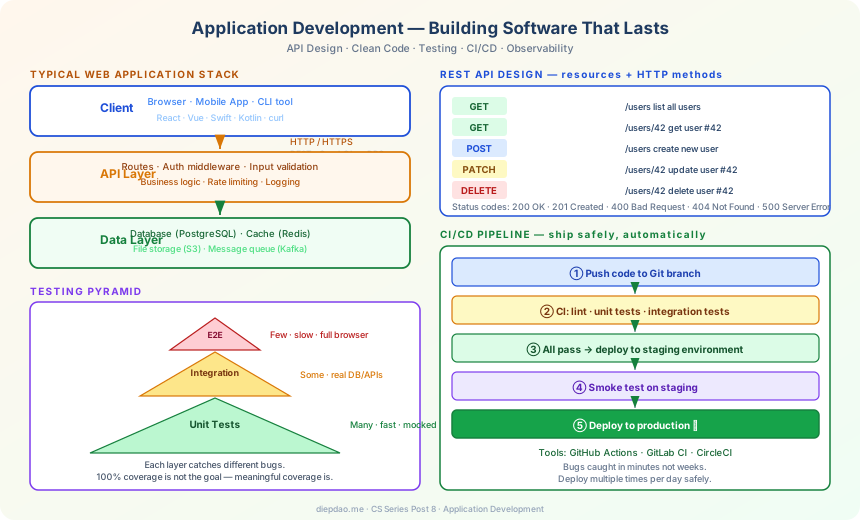
The Big Picture
╔══════════════════════════════════════════════════════════════════════════════╗
║                  Application Development Landscape                           ║
╠══════════════════════════════════════════════════════════════════════════════╣
║                                                                              ║
║  Layers of a typical web application:                                        ║
║                                                                              ║
║  ┌───────────────────────────────────────────────────────────────────────┐   ║
║  │   Client (browser, mobile app)                                        │   ║
║  │   HTML · CSS · JavaScript · React/Vue/Swift/Kotlin                    │   ║
║  └───────────────────────────────┬───────────────────────────────────────┘   ║
║                                  │ HTTP/HTTPS (REST, GraphQL, gRPC)          ║
║  ┌───────────────────────────────▼───────────────────────────────────────┐   ║
║  │   API Layer (backend)                                                 │   ║
║  │   Routes · Authentication · Business Logic · Input Validation         │   ║
║  └───────────────────────────────┬───────────────────────────────────────┘   ║
║                                  │                                           ║
║  ┌───────────────────────────────▼───────────────────────────────────────┐   ║
║  │   Data Layer                                                          │   ║
║  │   Database · Cache (Redis) · File storage (S3) · Message Queue        │   ║
║  └───────────────────────────────────────────────────────────────────────┘   ║
║                                                                              ║
╠══════════════════════════════════════════════════════════════════════════════╣
║  Engineering Practices                                                       ║
║  Testing: unit · integration · end-to-end                                    ║
║  CI/CD: automated build → test → deploy                                      ║
║  Code review: catch bugs, spread knowledge, maintain quality                 ║
╚══════════════════════════════════════════════════════════════════════════════╝
1. API Design — Defining the Contract
An API (Application Programming Interface) is the interface between components — how the frontend talks to the backend, how services talk to each other.
Good API design makes software easy to use correctly and hard to use incorrectly.
REST
REST (Representational State Transfer) uses HTTP methods and URL paths to represent operations on resources.
GET    /users           → list all users
GET    /users/123       → get user with id 123
POST   /users           → create a new user
PUT    /users/123       → replace user 123
PATCH  /users/123       → partially update user 123
DELETE /users/123       → delete user 123
Good REST API rules:
- Use nouns for resources, not verbs (
/usersnot/getUser) - Use HTTP status codes correctly (200, 201, 400, 404, 500)
- Return consistent JSON structures
- Version your API (
/api/v1/users) to avoid breaking clients
// POST /users
{
  "name": "Alice",
  "email": "alice@example.com"
}

// Response: 201 Created
{
  "id": 42,
  "name": "Alice",
  "email": "alice@example.com",
  "created_at": "2026-03-27T10:00:00Z"
}
GraphQL
Instead of multiple endpoints, GraphQL has one endpoint and the client specifies exactly what fields it needs.
query {
  user(id: 42) {
    name
    orders {
      product
      amount
    }
  }
}
Returns exactly this — no more, no less. Avoids over-fetching (REST returns fields you don’t need) and under-fetching (REST needs multiple requests for nested data).
gRPC
Uses Protocol Buffers (binary format) instead of JSON. Faster, smaller messages. Used for internal service-to-service communication where performance matters.
2. Clean Code — Writing for Humans
Code is read far more often than it’s written. The primary audience for your code is other developers (including future you).
Naming
Good names eliminate comments:
# Bad:
def calc(x, y, z):
    return x * y * (1 - z)

# Good: name explains everything
def calculate_discounted_price(price, quantity, discount_rate):
    return price * quantity * (1 - discount_rate)
Functions Should Do One Thing
# Bad: one function doing too much
def process_order(order):
    validate_credit_card(order.card)
    charge_card(order.card, order.total)
    update_inventory(order.items)
    send_confirmation_email(order.user)
    log_to_analytics(order)

# Better: separate functions, orchestrated by one
def process_order(order):
    payment = charge_payment(order)
    fulfillment = fulfill_order(order)
    notify_user(order, payment)
Each function is testable, reusable, and easier to reason about.
Don’t Repeat Yourself (DRY)
If you copy-paste code, you create two places to update when logic changes. Extract shared logic into a function.
# Bad: same validation in 3 places
if len(username) < 3 or len(username) > 50:
    raise ValueError("Invalid username")

# Good: one place
def validate_username(username):
    if len(username) < 3 or len(username) > 50:
        raise ValueError("Invalid username")
Comments Explain Why, Not What
# Bad comment (restates the code):
i += 1  # increment i by 1

# Good comment (explains the why):
i += 1  # skip the header row which contains column names, not data
3. Architecture Patterns
Architecture is how you organise the major components of a system.
MVC — Model-View-Controller
The classic web pattern:
Model      → data and business logic (User, Order, Product)
View       → what the user sees (HTML, JSON, templates)
Controller → receives requests, calls model, returns view
A user visits /users/42. The controller calls User.find(42), passes the result to the view, which renders the HTML. The model doesn’t know about HTTP; the view doesn’t know about the database.
Layered Architecture
┌──────────────────────────────────┐
│       Presentation Layer         │  HTTP handlers, input parsing
├──────────────────────────────────┤
│       Business Logic Layer       │  rules, workflows, validation
├──────────────────────────────────┤
│       Data Access Layer          │  database queries, caching
├──────────────────────────────────┤
│       Infrastructure Layer       │  email, S3, external APIs
└──────────────────────────────────┘
Each layer only depends on layers below it. Business logic doesn’t know about HTTP. Data access doesn’t know about business rules. This separation makes testing easy and changes safe.
Microservices vs Monolith
Monolith: all code in one deployment. Simple to develop and deploy. Works well for small teams and early-stage products.
Microservices: split into many small services, each deployable independently. Each service owns one domain (users, payments, inventory).
Monolith:           Microservices:
┌──────────────┐    ┌──────┐  ┌──────────┐  ┌───────────┐
│  Users       │    │Users │  │Payments  │  │Inventory  │
│  Payments    │    │ svc  │  │  svc     │  │   svc     │
│  Inventory   │    └──┬───┘  └────┬─────┘  └─────┬─────┘
│  Notifications│       │           │               │
└──────────────┘        └───────────┴───────────────┘
                              (communicate via API)
Microservices scale better (scale only the bottleneck service) but are much harder to operate. Don’t start with microservices — earn them by hitting the limits of your monolith.
4. Testing — Confidence in Your Code
Tests are how you know your code works — now and after future changes.
Unit Tests
Test one function in isolation. Fast. Lots of them.
def calculate_discount(price, discount_pct):
    if discount_pct < 0 or discount_pct > 100:
        raise ValueError("Discount must be 0-100")
    return price * (1 - discount_pct / 100)

# Unit test:
def test_calculate_discount():
    assert calculate_discount(100, 20) == 80.0
    assert calculate_discount(50, 0)  == 50.0
    assert calculate_discount(100, 100) == 0.0

def test_calculate_discount_invalid():
    with pytest.raises(ValueError):
        calculate_discount(100, -1)
    with pytest.raises(ValueError):
        calculate_discount(100, 101)
Integration Tests
Test how components work together — your code + the database, for example.
def test_create_user_saves_to_database():
    user = create_user(name="Alice", email="alice@test.com")
    # actually queries the database:
    found = User.query.get(user.id)
    assert found.name == "Alice"
Slower than unit tests because they touch real infrastructure. Don’t mock the database here — you want to catch real integration bugs.
End-to-End Tests
Simulate a real user interacting with the full app through a browser.
def test_user_can_login_and_see_dashboard():
    browser.visit("/login")
    browser.fill("email", "alice@test.com")
    browser.fill("password", "secret")
    browser.click("Login")
    assert browser.url == "/dashboard"
    assert "Welcome, Alice" in browser.html
Slow, fragile, but catch real user-facing bugs. Run a small suite of critical paths.
Test Coverage and the Testing Pyramid
           /\
          /E2E\       few (slow, expensive)
         /──────\
        /Integr. \    some (medium speed)
       /────────── \
      /  Unit Tests \  many (fast, cheap)
     /──────────────── \
Aim for many unit tests, fewer integration tests, few E2E tests. 100% coverage is not the goal — meaningful coverage of important paths is.
5. CI/CD — Shipping Safely
CI (Continuous Integration): every code change is automatically built and tested. CD (Continuous Deployment): every passing build is automatically deployed to production.
Developer pushes code
         ↓
CI system runs:
  - lint (code style check)
  - unit tests
  - integration tests
  - security scan
         ↓
  All pass? → deploy to staging
         ↓
  Manual review or automated smoke test
         ↓
  Deploy to production
With CI/CD:
- Bugs are caught in minutes, not weeks
- Deployments happen multiple times a day, not once a month
- “Integration hell” (many changes accumulating) disappears
- The team always has a working version
Tools: GitHub Actions, GitLab CI, CircleCI, Jenkins.
6. Version Control — Never Lose Work
Git is the universal version control system. Every change is tracked, attributable, and reversible.
git add changed_file.py          # stage changes
git commit -m "Fix null check in payment validation"
git push origin feature/payments # share with team

git log --oneline                # see history
git blame payments.py            # who changed each line, when
git diff main..feature/payments  # what changed vs main branch
Git Workflow
A simple workflow for teams:
main branch:     always deployable, always tested
feature branches: one branch per feature/bug
                  "feature/add-search", "fix/login-timeout"
                  merged into main via pull request (code review)
Pull Request (PR): a proposal to merge changes. Teammates review the code, catch bugs, suggest improvements, before it’s merged. PR review is one of the highest-value engineering practices.
7. Observability — Knowing What’s Happening
Once your app is running, how do you know if it’s healthy?
Logging
Record what happened:
import logging

logger = logging.getLogger(__name__)

def process_payment(order_id, amount):
    logger.info(f"Processing payment for order {order_id}, amount={amount}")
    try:
        result = payment_gateway.charge(amount)
        logger.info(f"Payment successful for order {order_id}")
        return result
    except PaymentError as e:
        logger.error(f"Payment failed for order {order_id}: {e}")
        raise
Log at different levels: DEBUG (detailed debugging), INFO (normal events), WARNING (something unexpected but recoverable), ERROR (something failed).
Metrics
Count and measure things over time:
- Requests per second
- Response time (p50, p95, p99)
- Error rate
- Database query latency
- Memory and CPU usage
Visualize in dashboards (Grafana, Datadog). Alert when metrics go out of range.
Tracing
Follow a request through multiple services:
Request: GET /api/orders/123
  ↳ Auth service (2ms)
  ↳ Orders service (45ms)
      ↳ Database query (40ms)  ← slow! investigate here
  ↳ Response (47ms total)
Distributed tracing (Jaeger, Zipkin) shows where time is spent across the whole system.
Summary
Building software that lasts requires more than just code:
Good API design    → easy for clients to use correctly
Clean code         → easy to read, change, and test
Good architecture  → changes don't break unrelated things
Testing            → confidence that code works now and later
CI/CD              → catch bugs early, ship safely
Version control    → never lose work, collaborate safely
Observability      → know what's happening in production
Professional software engineering is mostly about managing complexity over time. Every practice here — clean code, testing, CI/CD — pays compound returns. A codebase without tests becomes impossible to change. A codebase with them stays easy to change for years.
In the next post, we’ll scale up: Distributed Systems — what happens when one machine isn’t enough, and the new class of problems that emerge.
Back to the series: Welcome to the Computer Science Series
Comments