 Diep Dao
Networks & Security: How the Internet Works and How to Protect It
This is Post 6 in the Computer Science Series. The previous post covered data structures. Now we look at how computers communicate — and how we keep that communication secure.
Every time you open a website, send a message, or stream a video, your data travels through dozens of machines across the globe. Understanding how this works — and how attackers try to break it — is essential for anyone building or using software.
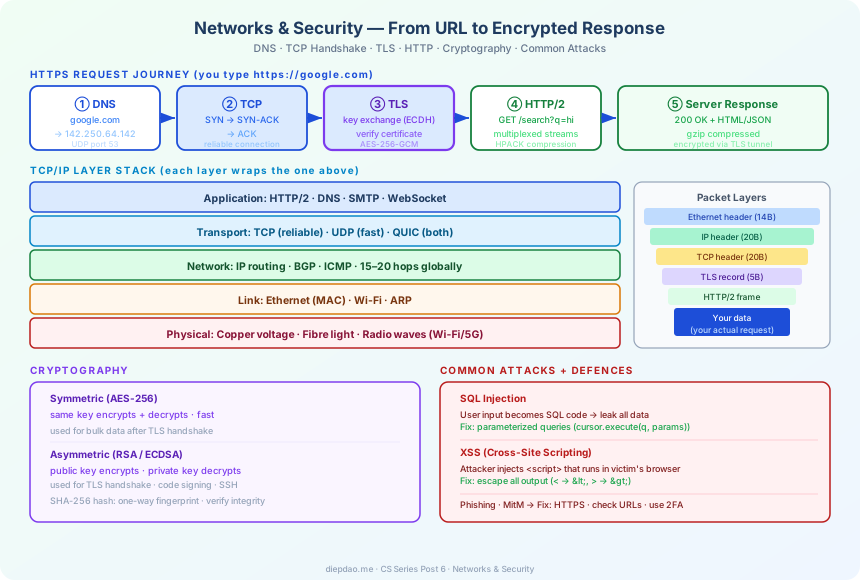
The Big Picture
╔══════════════════════════════════════════════════════════════════════════════╗
║                      Networks & Security Overview                             ║
╠══════════════════════════════════════════════════════════════════════════════╣
║                                                                               ║
║  You type: https://google.com                                                 ║
║                                                                               ║
║  1. DNS     → "google.com" → 142.250.64.142    (find the address)             ║
║  2. TCP     → 3-way handshake                  (establish connection)         ║
║  3. TLS     → exchange keys, verify identity   (secure the tunnel)            ║
║  4. HTTP    → GET /search?q=hello              (send your request)            ║
║  5. Server  → processes request, sends HTML    (server responds)              ║
║  6. Browser → renders the page                 (you see results)              ║
║                                                                               ║
╠══════════════════════════════════════════════════════════════════════════════╣
║  Security Layers                                                              ║
║                                                                               ║
║  Confidentiality  → encryption (AES, TLS)       no one reads your data        ║
║  Integrity        → hashing (SHA-256, HMAC)     data wasn't tampered          ║
║  Authentication   → certificates, passwords     you are who you say you are   ║
║  Authorization    → permissions, OAuth          you're allowed to do this     ║
╚══════════════════════════════════════════════════════════════════════════════╝
1. The Internet Is Just Layers
The internet is built from layers of protocols, each solving one part of the problem.
Application Layer    HTTP, HTTPS, DNS, SMTP, WebSocket
      ↓  ↑
Transport Layer      TCP, UDP, QUIC
      ↓  ↑
Network Layer        IP (IPv4, IPv6), routing
      ↓  ↑
Data Link Layer      Ethernet, Wi-Fi, ARP
      ↓  ↑
Physical Layer       Cables, fibre, radio waves
Each layer only talks to the layer above and below it. You can swap Wi-Fi for fibre without changing TCP. You can switch from HTTP to HTTP/2 without changing IP.
2. IP Addresses — The Internet’s Postal Code
Every device on the internet has an IP address — a unique identifier that lets packets find their destination.
IPv4: 32 bits, written as four 0–255 numbers.
142.250.64.142   (Google's server)
192.168.1.1      (your home router — private, not reachable from internet)
IPv6: 128 bits, because the world is running out of IPv4 addresses.
2607:f8b0:4004:c08::8b (same Google server in IPv6)
Packets hop from router to router, each one forwarding toward the destination. A packet from Vietnam to the US might traverse 15–20 routers.
Your home network: your router gives each device a private IP (192.168.x.x). When you access the internet, the router translates through NAT (Network Address Translation) — many devices share one public IP.
3. DNS — Translating Names to Addresses
You type youtube.com. Your computer doesn’t know where that is. DNS (Domain Name System) translates human-readable names to IP addresses.
Step 1: Your browser checks its local cache. Found? Done.
Step 2: Ask your OS → checks /etc/hosts and its cache.
Step 3: Ask your router (recursive resolver).
Step 4: Resolver asks root nameserver → "where is .com?"
Step 5: Resolver asks .com nameserver → "where is youtube.com?"
Step 6: Resolver asks YouTube's nameserver → "142.250.76.206"
Step 7: Resolver returns the IP to your browser. Cached for next time.
DNS queries use UDP (fast, no connection needed) on port 53.
Why DNS matters for security:
- DNS spoofing: an attacker poisons a DNS cache with a fake IP → you visit a fake website
- DNSSEC: adds cryptographic signatures to DNS responses to prevent spoofing
4. TCP — Reliable Delivery
IP gets packets to the right address but doesn’t guarantee they arrive, arrive in order, or arrive at all. TCP (Transmission Control Protocol) adds reliability on top of IP.
The Three-Way Handshake
Before any data is sent, TCP establishes a connection:
Client                    Server
  │                         │
  │──── SYN ──────────────▶│   "I want to connect"
  │                         │
  │◀─── SYN-ACK ────────────│   "OK, I'm listening"
  │                         │
  │──── ACK ──────────────▶│   "Great, let's go"
  │                         │
  │═══════ data ════════════│   connection established
Reliability Features
- Sequence numbers: every byte is numbered. Receiver can detect missing bytes.
- Acknowledgements: receiver sends ACK for received data. Sender retransmits if no ACK.
- Flow control: receiver tells sender how much it can accept (receive window).
- Congestion control: TCP slows down if the network is congested (CUBIC, BBR algorithms).
UDP — Fast But Unreliable
UDP (User Datagram Protocol) skips all the reliability overhead:
No handshake. No acknowledgements. No ordering.
Just: send this packet. Maybe it arrives.
Used where speed > reliability: live video calls (dropped frames are better than delay), online gaming, DNS, streaming.
5. HTTP — The Web’s Language
HTTP (HyperText Transfer Protocol) is how browsers request content from servers.
GET /index.html HTTP/1.1
Host: example.com
Accept: text/html

─────── response ───────

HTTP/1.1 200 OK
Content-Type: text/html
Content-Length: 1234

<html>...</html>
HTTP methods:
GET: retrieve data (no side effects)POST: send data to server (create a resource)PUT: replace a resourceDELETE: delete a resource
Status codes:
200 OK: success301 Moved Permanently: redirect404 Not Found: resource doesn’t exist500 Internal Server Error: server crashed
HTTP/2 and HTTP/3
HTTP/1.1 opens a new TCP connection for each request — slow. HTTP/2 multiplexes many requests over one connection. HTTP/3 runs over QUIC (UDP-based) to eliminate TCP’s head-of-line blocking.
6. TLS — Encrypting the Connection
HTTP alone sends data in plaintext — anyone on the network can read it. TLS (Transport Layer Security) wraps HTTP in an encrypted tunnel (giving you HTTPS).
The TLS Handshake
Client                              Server
  │                                   │
  │──── ClientHello ────────────────▶│  "I support AES-256, ChaCha20..."
  │                                   │
  │◀─── ServerHello + Certificate ───│  "Use AES-256. Here's my identity proof."
  │                                   │
  │  (client verifies certificate     │
  │   was signed by a trusted CA)     │
  │                                   │
  │──── Key Exchange (ECDH) ────────▶│  "Here's my public key"
  │◀─── Key Exchange (ECDH) ──────────│  "Here's my public key"
  │                                   │
  │  Both compute same shared secret  │  (derived from ECDH without transmitting it)
  │                                   │
  │═══════ Encrypted data ════════════│  (AES-256-GCM with shared secret)
After the handshake, all data is encrypted with AES-256 — a symmetric cipher that’s fast and secure.
The magic of ECDH (Elliptic Curve Diffie-Hellman): both sides can compute the same secret key without ever transmitting it. An attacker watching the network cannot derive the key even if they capture all traffic.
7. Cryptography — The Science of Secrets
Symmetric Encryption
Same key for encryption and decryption. Fast.
plaintext + key → [AES-256] → ciphertext
ciphertext + key → [AES-256] → plaintext (same key)
AES-256 (Advanced Encryption Standard with 256-bit key) is the gold standard. No practical attack is known. Used everywhere: disk encryption, TLS, messaging apps.
Asymmetric Encryption (Public-Key Cryptography)
Two mathematically linked keys: a public key (share with everyone) and a private key (never share).
Encrypt with public key  → only private key can decrypt
Sign with private key    → anyone with public key can verify the signature
RSA and ECDSA are the common algorithms. Used for:
- Certificates (servers prove their identity)
- SSH keys (log into servers without passwords)
- Code signing (verify software came from the real author)
Hashing
A hash function turns any input into a fixed-size fingerprint. Same input always gives same output. But you can’t reverse it — you can’t get the original from the hash.
SHA-256("hello")  → 2cf24dba5f...  (64 hex characters)
SHA-256("hello!") → 3610538de8...  (completely different)
SHA-256("hello")  → 2cf24dba5f...  (same as first — deterministic)
Used for:
- Storing passwords (store hash, not password. Verify: hash what user types, compare.)
- File integrity (download a file, hash it, compare to the official hash — was it tampered?)
- Digital signatures (sign the hash, not the whole message)
Never store passwords in plaintext. If a database is breached, users are exposed. Always hash with a slow algorithm like bcrypt or Argon2 that makes brute-force guessing slow.
8. Common Attacks
SQL Injection
An attacker puts SQL code inside user input:
# VULNERABLE code:
query = "SELECT * FROM users WHERE name='" + username + "'"

# Attacker types username:  alice' OR '1'='1
# Query becomes:
SELECT * FROM users WHERE name='alice' OR '1'='1'
# '1'='1' is always true → returns ALL users!
Fix: use parameterized queries / prepared statements:
cursor.execute("SELECT * FROM users WHERE name = ?", (username,))
The database treats the input as data, never as code.
Cross-Site Scripting (XSS)
Attacker injects JavaScript into a webpage:
<!-- Vulnerable: website shows user comments without escaping -->
<p>Comment: <script>document.cookie = "stolen:" + document.cookie</script></p>
If a victim views this page, the script runs in their browser and can steal their session cookie.
Fix: escape all user input before displaying it (< → <, etc.).
Phishing
Attacker sends a convincing fake email:
From: security@paypa1.com  (note: paypa1 not paypal)
Subject: Your account is suspended

Click here: http://paypa1-login.evil.com
Victim enters their credentials on the fake site. Attacker has them.
Defences: check the URL carefully, use a password manager (it won’t autofill on wrong domains), use 2FA.
Man-in-the-Middle
Without TLS, an attacker on the same Wi-Fi can intercept all traffic:
You → [attacker's device] → server
          ↑ reads everything
Fix: always use HTTPS. HSTS (HTTP Strict Transport Security) tells browsers to always use HTTPS for a domain, even if you type http://.
9. Authentication and Authorization
Authentication: who are you? Authorization: what are you allowed to do?
Passwords
- Store a salted hash (
bcrypt(password + random_salt)) - Use a password manager — every site gets a unique random password
- Enable 2FA (two-factor authentication) wherever possible
JWT (JSON Web Tokens)
Common for APIs. After login, the server issues a signed token:
Header.Payload.Signature

Payload: { "user_id": 123, "role": "admin", "exp": 1741737600 }
Signature: HMAC-SHA256(header + payload, server_secret)
The server signs it. On future requests, the server verifies the signature — no need to look up a session in the database. The token is self-contained.
Risk: if a JWT doesn’t expire (or expires far in the future), a stolen token grants access forever.
OAuth 2.0
“Login with Google” flows use OAuth:
1. You click "Login with Google"
2. Browser redirects to Google's auth page
3. You approve → Google sends an authorization code to the app
4. App exchanges code for access token (behind the scenes)
5. App uses token to call Google APIs (read your profile, email, etc.)
The app never sees your Google password. Google controls what data the app can access.
10. HTTPS Certificates — Trust on the Internet
How does your browser know it’s talking to the real Google and not an impersonator?
Certificate Authorities (CAs) are organizations that everyone trusts. They verify that a server owner really owns a domain, then issue a certificate — a signed document proving their identity.
Google's certificate says:
  Domain: *.google.com
  Public Key: [google's public key]
  Signed by: DigiCert (a trusted CA)
Your OS and browser come pre-installed with ~150 trusted CAs. When you visit Google, your browser:
- Receives Google’s certificate
- Checks the CA’s signature — is it trusted?
- Checks the domain matches
- Checks it’s not expired
- Establishes the encrypted TLS connection
If any step fails, you see “Your connection is not private” — a warning to go back.
Summary
The internet is built on a remarkable collaboration of protocols:
DNS      →  translate names to IP addresses
IP       →  route packets across the globe
TCP      →  reliable, ordered delivery
TLS      →  encrypted, authenticated connections
HTTP     →  request and respond with web content
Certs    →  prove you're talking to the right server
Auth     →  prove who you are; control what you can do
Security isn’t a feature you bolt on at the end. It’s woven into the fabric of every protocol. When it’s missing or misconfigured, attackers exploit the gap.
Key rules:
- Always use HTTPS
- Never store passwords in plaintext
- Use parameterized queries to prevent SQL injection
- Escape output to prevent XSS
- Use 2FA on important accounts
- Check URLs before entering credentials
In the next post, we’ll look at Databases — how we store and query large amounts of data reliably.
Back to the series: Welcome to the Computer Science Series
Comments