 Diep Dao
Operating Systems: The Software That Runs Everything Else
This is Post 3 in the Computer Science Series. The previous post explained how a CPU executes instructions. Now we look at the software that manages the CPU — the Operating System.
Right now, on your computer, hundreds of programs are running at the same time. Your browser, your music app, background updaters, virus scanners. Yet you only have one CPU (or a few cores). How does every program get time to run? How do they all share memory without stepping on each other? How do files survive when you turn the computer off?
The OS answers all of these questions.
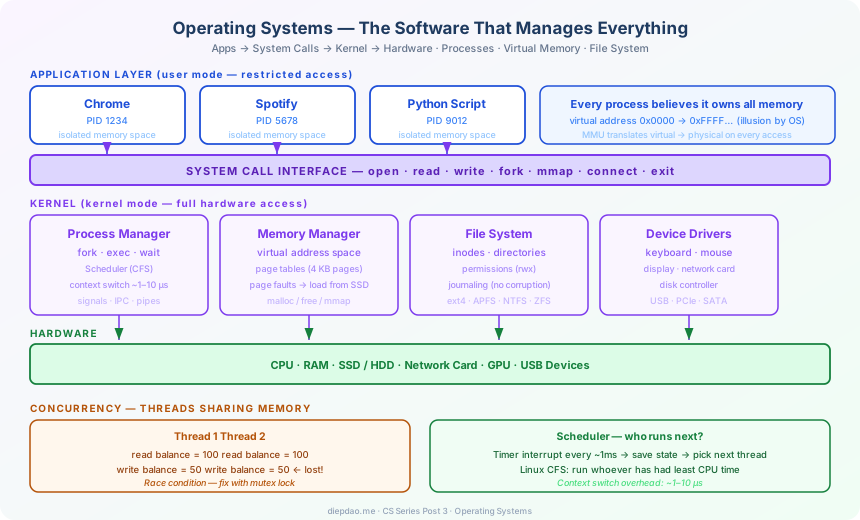
The Big Picture
╔══════════════════════════════════════════════════════════════════════════════╗
║                     Operating System Overview                                ║
╠══════════════════════════════════════════════════════════════════════════════╣
║                                                                              ║
║  ┌──────────────────────────────────────────────────────────────────────┐    ║
║  │                    Your Applications                                 │    ║
║  │   Chrome · VSCode · Minecraft · Spotify · Python script              │    ║
║  └──────────────────────────────────┬───────────────────────────────────┘    ║
║                                     │  system calls (open, read, write...)   ║
║  ┌──────────────────────────────────▼───────────────────────────────────┐    ║
║  │                    Operating System Kernel                           │    ║
║  │                                                                      │    ║
║  │  ┌─────────────┐  ┌─────────────┐  ┌─────────────┐  ┌───────────┐  │      ║
║  │  │  Process    │  │   Memory    │  │    File     │  │  Device   │  │      ║
║  │  │  Manager    │  │  Manager    │  │   System    │  │  Drivers  │  │      ║
║  │  │             │  │             │  │             │  │           │  │      ║
║  │  │ scheduling  │  │ virtual mem │  │ directories │  │ keyboard  │  │      ║
║  │  │ isolation   │  │ paging      │  │ permissions │  │ display   │  │      ║
║  │  │ IPC         │  │ swap        │  │ journaling  │  │ network   │  │      ║
║  │  └─────────────┘  └─────────────┘  └─────────────┘  └───────────┘  │      ║
║  └──────────────────────────────────────────────────────────────────────┘    ║
║                                     │                                        ║
║  ┌──────────────────────────────────▼───────────────────────────────────┐    ║
║  │                         Hardware                                     │    ║
║  │           CPU · RAM · SSD · Network card · Display                   │    ║
║  └──────────────────────────────────────────────────────────────────────┘    ║
╚══════════════════════════════════════════════════════════════════════════════╝
The OS sits between your apps and the hardware. It gives every app a clean, safe view of the computer — without apps having to worry about sharing hardware with each other.
1. Processes — Each App Gets Its Own World
When you double-click Chrome, the OS creates a process — an isolated running instance of a program.
Each process gets its own:
- Memory space: Chrome can’t accidentally read Spotify’s memory
- File descriptors: open files and network connections
- CPU time: the scheduler decides when it runs
Analogy: Think of an OS like an apartment building. Each process is a tenant with their own apartment. They can’t walk into each other’s apartments — but they share the same building infrastructure (electricity, water, internet).
Process: Chrome (PID 1234)
  Memory: 0x0000 – 0x7FFF  (its own private space)
  Files:  [socket to google.com, cache files, bookmark file]
  CPU:    gets 20ms, then another process runs

Process: Spotify (PID 5678)
  Memory: 0x0000 – 0x7FFF  (same addresses — different physical RAM!)
  Files:  [socket to Spotify servers, music cache]
  CPU:    gets 20ms, then another process runs
How Processes Are Created
In Unix/Linux, almost every process is created by forking an existing one:
# pseudocode
child_pid = fork()          # creates an exact copy of the current process
if child_pid == 0:
    exec("chrome")          # child: replace itself with Chrome
else:
    wait(child_pid)         # parent: wait for child to finish
fork() copies the parent process. exec() replaces the copy with a new program. This two-step dance is how every Unix program starts.
2. Threads — Multiple Workers in One Apartment
A process is isolated from others. But inside one process, you might want to do several things at once — download data while keeping the UI responsive, for example.
Threads are like multiple workers inside the same apartment. They share memory, so they can work on the same data — but this sharing creates risk.
Chrome process:
  Thread 1: renders the webpage
  Thread 2: downloads the next image
  Thread 3: handles keyboard input
  Thread 4: runs JavaScript
  (all share the same memory space)
The problem: if Thread 1 and Thread 2 both try to update the same variable at the same time, you get a race condition:
Thread 1:  reads balance = 100
Thread 2:  reads balance = 100
Thread 1:  writes balance = 100 - 50 = 50
Thread 2:  writes balance = 100 - 50 = 50   ← lost the first withdrawal!
Both threads deducted 50, but the balance only went down by 50 instead of 100. The bank loses money.
Solving Race Conditions: Locks
A mutex (mutual exclusion lock) ensures only one thread accesses shared data at a time:
lock.acquire()
balance = balance - 50   # only one thread at a time can do this
lock.release()
Thread 2 will wait at lock.acquire() until Thread 1 calls lock.release(). The operation is now atomic — it can’t be interrupted halfway.
But locks have their own danger: deadlock.
Thread A: holds Lock 1, waiting for Lock 2
Thread B: holds Lock 2, waiting for Lock 1
→ both wait forever. System freezes.
Concurrency bugs are among the hardest to find and fix. They happen rarely, only under specific timing conditions, and are almost impossible to reproduce reliably.
3. The Scheduler — Who Gets the CPU?
You have 4 cores and 200 threads wanting to run. The scheduler decides who runs when.
Every few milliseconds, a timer interrupt fires. The CPU stops whatever it’s doing, jumps into the OS kernel, and the scheduler picks the next thread to run. This is a context switch:
Save current thread's state: registers, program counter → memory
Load next thread's state:    registers, program counter ← memory
Jump to next thread's code
A context switch takes ~1–10 microseconds. At 1,000 switches per second, that’s < 1% overhead — invisible to you.
Scheduling Strategies
| Strategy | How it works | Good for |
|---|---|---|
| Round-robin | each thread gets equal time slices | fairness |
| Priority-based | high-priority threads run first | real-time systems |
| CFS (Linux) | tracks who’s had less CPU, runs them | general purpose |
| Completely Fair | tries to be fair across all processes | interactive systems |
The Linux CFS (Completely Fair Scheduler) is the default. It uses a red-black tree ordered by “virtual runtime” — processes that have used less CPU time recently run next.
4. Virtual Memory — The Illusion of Infinite RAM
Here’s a magic trick: every process thinks it has the entire address space to itself — 0x0000000000000000 to 0xFFFFFFFFFFFFFFFF. But your computer only has, say, 16 GB of RAM.
Virtual memory creates this illusion. The CPU’s MMU (Memory Management Unit) translates every memory address from virtual → physical on the fly.
Virtual address (what the program uses):   0x00400000
                         ↓  (MMU translation table)
Physical address (actual RAM location):    0x1A3B5000
Why Virtual Memory Is Brilliant
1. Isolation: Chrome at virtual address 0x1000 and Spotify at virtual address 0x1000 map to different physical RAM. They can never see each other’s data.
2. More memory than you have: the OS can move pages of memory to SSD (swap) when RAM is full, then load them back when needed. Your program never knows.
3. Shared libraries: libc.so (the C standard library) is loaded once into physical RAM and mapped into every process’s virtual space. 200 processes share one copy instead of loading 200 copies.
Pages and Page Tables
Memory is divided into 4 KB chunks called pages. The OS maintains a page table for each process — a mapping from virtual page numbers to physical page numbers.
Virtual page 0  → Physical page 42
Virtual page 1  → Physical page 107
Virtual page 2  → on SSD (swapped out)
Virtual page 3  → Physical page 89
If a program accesses virtual page 2, the MMU sees “on SSD”, triggers a page fault, the OS loads the page from SSD to RAM, updates the table, and resumes the program. The program never knew anything happened.
5. System Calls — Crossing the Boundary
Programs can’t access hardware directly. They must ask the OS through system calls.
open("/etc/passwd", O_RDONLY)   # open a file
read(fd, buffer, 1024)          # read bytes from file
write(1, "Hello\n", 6)          # write to stdout
connect(sock, addr, len)        # connect to a server
fork()                          # create a child process
exit(0)                         # terminate
When a program calls open(), the CPU switches from user mode (restricted) to kernel mode (full hardware access). The kernel performs the action, then switches back. This boundary is the OS’s main security guarantee.
Your code (user mode)  →  system call  →  kernel (kernel mode)
     can't touch hardware               CAN touch hardware
     can't see other processes' memory  CAN manage all memory
6. The File System — Surviving Power Cuts
When you save a file, where does it go? The file system organises data on disk into a tree of directories and files that survives reboots.
Inodes
Every file on disk has an inode — a small structure containing:
- File size
- Ownership and permissions
- Timestamps (created, modified, accessed)
- Pointers to data blocks on disk
The file’s name is separate from its inode. A directory is just a list of (name → inode number) mappings. This is why you can have multiple names (links) for the same file.
Directory /home/alice:
  "notes.txt"  →  inode 4521
  "photo.jpg"  →  inode 8832
  "docs"       →  inode 1105  (directory — points to another list)
Journaling — No Data Loss on Crash
Saving a file involves multiple disk writes. If power cuts out halfway, the file could be corrupted.
Modern file systems (ext4, NTFS, APFS, ZFS) use journaling: before making changes, write a log entry describing what you’re about to do. If the system crashes, on reboot the OS checks the journal and finishes or undoes incomplete operations.
Journal:  "about to write 4 blocks starting at block 2048"
          ← crash happens here →
On boot:  "found incomplete journal entry → finish writing or discard"
Result:   file is either fully written or not written at all — never half-written
Permissions
Every file has:
- Owner: the user who owns it
- Group: a group of users
- Permissions: read (r), write (w), execute (x) for owner, group, and others
-rw-r--r-- 1 alice staff 2048 Mar 21 secrets.txt
 ↑↑↑ ↑↑↑ ↑↑↑
 |   |   |
 |   |   └── others: read-only
 |   └────── group: read-only
 └────────── owner: read + write
This is why you can’t read /etc/shadow (the password file) without being root — it’s set to ----------, readable only by the kernel.
7. Putting It Together: What Happens When You Open a File
f = open("data.txt", "r")   # Python call
content = f.read()
Here’s what actually happens:
1. Python calls open("data.txt", O_RDONLY)
2. CPU switches to kernel mode (system call)
3. Kernel looks up "data.txt" in the current directory → finds inode 4521
4. Kernel checks: does this process have read permission? Yes.
5. Kernel opens the file, returns file descriptor 3
6. Python calls read(3, buffer, size)
7. Kernel checks: is the data in the page cache (RAM)?
   → Yes: copy from page cache to user buffer (fast!)
   → No:  read from SSD into page cache, then copy (slow)
8. Return to user mode with the data
9. Python receives the bytes
The OS hid all of that from you. From Python’s view: open() returns a file object.
8. Common Operating Systems
| OS | Kernel | Used by |
|---|---|---|
| Linux | Linux | Servers, Android, Raspberry Pi, HPC |
| macOS | XNU | Apple laptops and desktops |
| Windows | NT | Most personal computers |
| iOS | XNU | iPhones and iPads |
| Android | Linux | Most smartphones |
Linux powers ~96% of the world’s servers. Understanding Linux — processes, files, permissions, system calls — is essential for anyone building software that runs in the cloud.
Summary
The OS is the unseen foundation that everything else depends on:
Your app runs in a process (isolated memory, safe from other apps)
       ↓
Threads let the app do multiple things at once (carefully, with locks)
       ↓
The scheduler gives each thread fair CPU time (context switches)
       ↓
Virtual memory gives each process its own address space
       ↓
System calls let apps safely request hardware access from the kernel
       ↓
The file system organises data on disk and survives power cuts
Every time you open an app, the OS creates a process, allocates memory, loads the executable from disk, sets up threads, and starts the scheduler — in milliseconds.
In the next post, we’ll look at Algorithms — the precise, step-by-step recipes that determine how efficiently we can solve problems, from sorting a list to navigating a map.
Back to the series: Welcome to the Computer Science Series
Comments