 Diep Dao
Algorithms: Thinking About Efficiency
This is Post 4 in the Computer Science Series. The previous post covered operating systems. Now we get to the heart of computer science: algorithms.
An algorithm is a step-by-step recipe for solving a problem. The question is never just “does it work?” — it’s “how fast does it work, and does it get slow as the problem gets bigger?”
A bad algorithm can take thousands of years on a fast computer. A good algorithm can solve the same problem in milliseconds.
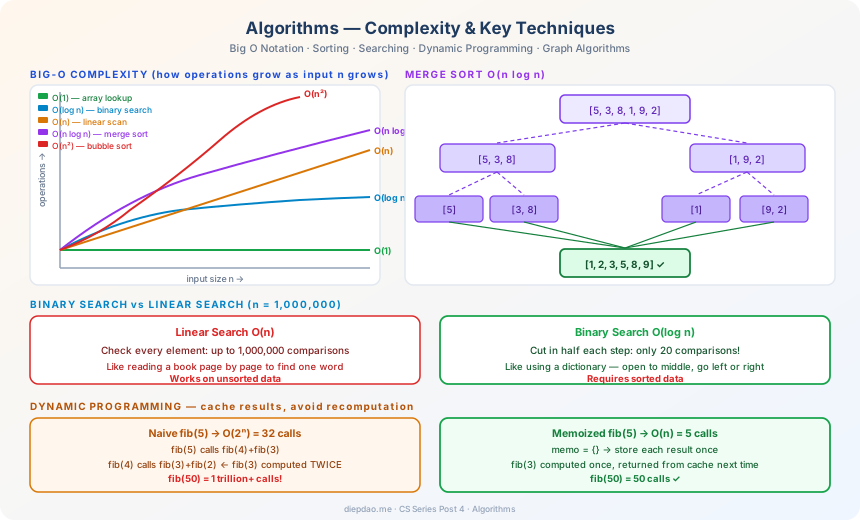
The Big Picture
╔════════════════════════════════════════════════════════════════════════╗
║                    Algorithm Complexity                                ║
╠════════════════════════════════════════════════════════════════════════╣
║                                                                        ║
║  n = input size. How many operations does the algorithm need?          ║
║                                                                        ║
║  O(1)        constant    — same speed regardless of input size         ║
║  O(log n)    logarithmic — doubles input → 1 more step                 ║
║  O(n)        linear      — doubles input → 2x more steps               ║
║  O(n log n)  linearithmic— sorting (merge sort, heap sort)             ║
║  O(n²)       quadratic   — nested loops, bubble sort                   ║
║  O(2ⁿ)       exponential — doubles with every 1-element increase       ║
║                                                                        ║
║  For n = 1,000,000:                                                    ║
║  O(1)        →           1 op                                          ║
║  O(log n)    →          20 ops                                         ║
║  O(n)        →   1,000,000 ops                                         ║
║  O(n log n)  →  20,000,000 ops                                         ║
║  O(n²)       →   1,000,000,000,000 ops  ← takes ~16 minutes at 1GHz    ║
║  O(2ⁿ)       →   way more than atoms in the observable universe        ║
╠════════════════════════════════════════════════════════════════════════╣
║                    Key Algorithm Families                              ║
║                                                                        ║
║  Sorting:    merge sort O(n log n), quicksort O(n log n) avg           ║
║  Searching:  linear O(n), binary search O(log n)                       ║
║  Graphs:     BFS/DFS O(V+E), Dijkstra O(E log V)                       ║
║  DP:         avoid recomputing → exponential → polynomial              ║
║  Greedy:     local best choice → often global best (not always!)       ║
╚════════════════════════════════════════════════════════════════════════╝
1. Big O Notation — Measuring Speed
Before comparing algorithms, we need a language. Big O notation describes how an algorithm’s running time grows as the input size grows.
We ignore constants and small terms — we care about the shape of growth, not the exact number.
f(n) = 3n² + 10n + 5   →   O(n²)   (quadratic dominates)
f(n) = 100n             →   O(n)    (ignore the constant 100)
f(n) = log n + 1000     →   O(log n)
Intuition for each complexity class:
O(1) — constant time. Looking up a value by index in an array. Doesn’t matter if the array has 10 or 10 million elements.
O(log n) — logarithmic. Each step cuts the problem in half. Finding a word in a dictionary by opening to the middle, then the middle of one half, etc.
O(n) — linear. Reading every element once. Finding a specific page in a book by reading page by page.
O(n log n) — most efficient sorting algorithms. Unavoidable for comparison-based sorting.
O(n²) — quadratic. Comparing every element to every other element. Slow for large inputs.
O(2ⁿ) — exponential. The algorithm’s work doubles for every additional element. Fine for n=20, impossible for n=60.
2. Searching — Finding a Needle
Linear Search — O(n)
The simplest approach: check every element until you find it.
def linear_search(arr, target):
    for i, value in enumerate(arr):
        if value == target:
            return i
    return -1   # not found
In the worst case (target is last or not present), you check every element. For a million elements: a million checks.
Binary Search — O(log n)
Works on sorted data. Each step cuts the search space in half.
def binary_search(arr, target):
    left, right = 0, len(arr) - 1
    while left <= right:
        mid = (left + right) // 2
        if arr[mid] == target:
            return mid
        elif arr[mid] < target:
            left = mid + 1    # target is in the right half
        else:
            right = mid - 1   # target is in the left half
    return -1
For a million elements: at most 20 checks (log₂(1,000,000) ≈ 20). This is the power of O(log n).
Dictionary analogy: to find “python” in a dictionary, you open to the middle (M), see M comes before P, so you look in the second half. Open to that midpoint (S), P comes before S, look in the first half. You find P in a few steps — not by reading every word.
3. Sorting — Putting Things in Order
Sorting is one of the most-studied problems in CS. Many operations become much faster on sorted data (binary search, deduplication, merging).
Bubble Sort — O(n²) — The Slow One
Compare adjacent pairs. Swap if out of order. Repeat until nothing swaps.
def bubble_sort(arr):
    n = len(arr)
    for i in range(n):
        for j in range(n - i - 1):
            if arr[j] > arr[j + 1]:
                arr[j], arr[j + 1] = arr[j + 1], arr[j]
Pass 1: [5, 3, 8, 1] → [3, 5, 1, 8]  (8 "bubbled" to end)
Pass 2: [3, 5, 1, 8] → [3, 1, 5, 8]
Pass 3: [3, 1, 5, 8] → [1, 3, 5, 8]
Simple to understand, terrible performance. Never use for large datasets.
Merge Sort — O(n log n) — Divide and Conquer
Split the array in half, sort each half recursively, merge the two sorted halves.
def merge_sort(arr):
    if len(arr) <= 1:
        return arr
    mid = len(arr) // 2
    left = merge_sort(arr[:mid])
    right = merge_sort(arr[mid:])
    return merge(left, right)

def merge(left, right):
    result = []
    i = j = 0
    while i < len(left) and j < len(right):
        if left[i] <= right[j]:
            result.append(left[i]); i += 1
        else:
            result.append(right[j]); j += 1
    return result + left[i:] + right[j:]
[5, 3, 8, 1]
   ↓   split
[5, 3] [8, 1]
  ↓       ↓
[3,5]   [1,8]
       ↓  merge
    [1, 3, 5, 8]
Each merge step takes O(n). There are O(log n) levels of splitting. Total: O(n log n).
Quicksort — O(n log n) average
Pick a “pivot” element. Partition: all smaller elements go left, larger go right. Recursively sort each side.
def quicksort(arr):
    if len(arr) <= 1:
        return arr
    pivot = arr[len(arr) // 2]
    left   = [x for x in arr if x < pivot]
    middle = [x for x in arr if x == pivot]
    right  = [x for x in arr if x > pivot]
    return quicksort(left) + middle + quicksort(right)
Quicksort is typically faster in practice than merge sort (better cache behaviour), even though both are O(n log n). Python’s built-in sorted() uses Timsort — a clever hybrid of merge sort and insertion sort.
4. Recursion — Functions That Call Themselves
Many algorithms are naturally recursive: the algorithm for a problem of size n calls itself on a smaller problem.
def factorial(n):
    if n == 0:
        return 1          # base case — stops the recursion
    return n * factorial(n - 1)   # recursive case

factorial(5) = 5 × factorial(4)
             = 5 × 4 × factorial(3)
             = 5 × 4 × 3 × factorial(2)
             = 5 × 4 × 3 × 2 × factorial(1)
             = 5 × 4 × 3 × 2 × 1 × factorial(0)
             = 5 × 4 × 3 × 2 × 1 × 1
             = 120
Every recursive function needs:
- A base case that stops the recursion
- A recursive case that makes progress toward the base case
Without a base case, you get infinite recursion — a stack overflow.
5. Dynamic Programming — Remember Your Work
Some problems have overlapping subproblems — you compute the same thing over and over.
Example: Fibonacci numbers (each number = sum of the previous two)
# Naive recursive — O(2ⁿ) — exponential!
def fib(n):
    if n <= 1: return n
    return fib(n - 1) + fib(n - 2)

# fib(5) calls fib(3) twice, fib(2) three times, fib(1) five times...
The problem: fib(3) is computed over and over. For fib(50), the naive version makes 2^50 calls — more than a trillion.
Dynamic programming fixes this by caching results:
# Memoized — O(n) — much better!
memo = {}
def fib(n):
    if n <= 1: return n
    if n in memo: return memo[n]   # already computed!
    memo[n] = fib(n - 1) + fib(n - 2)
    return memo[n]

# Or bottom-up (even simpler):
def fib(n):
    a, b = 0, 1
    for _ in range(n):
        a, b = b, a + b
    return a
DP turns exponential problems into polynomial ones. It’s used everywhere:
- Spell checkers (edit distance)
- GPS navigation (shortest path)
- DNA sequence alignment
- Game AI (optimal move sequences)
6. Greedy Algorithms — Always Take the Best Step
A greedy algorithm makes the locally best choice at each step, hoping this leads to a globally best solution.
Example: Making change with the fewest coins
With coins [25¢, 10¢, 5¢, 1¢], what’s the minimum coins to make 41¢?
Greedy: always use the largest coin that fits
  41¢ → use 25¢  → 16¢ remaining
  16¢ → use 10¢  → 6¢ remaining
   6¢ → use 5¢   → 1¢ remaining
   1¢ → use 1¢   → done
Result: 4 coins [25, 10, 5, 1]  ✓ optimal!
Greedy works here. But it doesn’t always work. With coins [4¢, 3¢, 1¢], to make 6¢:
Greedy: 4¢ + 1¢ + 1¢ = 3 coins
Optimal: 3¢ + 3¢     = 2 coins  ← greedy failed!
Greedy algorithms are fast (usually O(n log n)) but only correct when the problem has the greedy choice property — local best choices always lead to a global best.
7. Graph Algorithms
Graphs model relationships: cities connected by roads, users connected by friendships, tasks connected by dependencies.
A graph has vertices (nodes) and edges (connections).
      A ── B
      |    |
      C ── D

Vertices: {A, B, C, D}
Edges: {A-B, A-C, B-D, C-D}
Breadth-First Search (BFS) — O(V + E)
Explore all neighbors at the current distance before going further. Finds the shortest path (in hops) between two nodes.
from collections import deque

def bfs(graph, start, target):
    queue = deque([[start]])
    visited = {start}
    while queue:
        path = queue.popleft()
        node = path[-1]
        if node == target:
            return path      # found it!
        for neighbor in graph[node]:
            if neighbor not in visited:
                visited.add(neighbor)
                queue.append(path + [neighbor])
Analogy: ripples expanding from a stone dropped in water — you explore all nodes 1 step away, then 2 steps, then 3.
Depth-First Search (DFS) — O(V + E)
Go as deep as possible before backtracking. Used for maze solving, cycle detection, topological sorting.
def dfs(graph, node, visited=None):
    if visited is None: visited = set()
    visited.add(node)
    for neighbor in graph[node]:
        if neighbor not in visited:
            dfs(graph, neighbor, visited)
    return visited
Dijkstra’s Algorithm — O(E log V)
Finds the shortest weighted path between nodes (where edges have costs, like road distances).
Graph with weights:
   A →3→ B →2→ D
   A →2→ C →4→ D

Shortest A→D:  A→B→D = 3+2 = 5
               A→C→D = 2+4 = 6
Dijkstra picks: A→B→D (cost 5)
Dijkstra’s algorithm is used in GPS navigation, network routing (OSPF), and game pathfinding (A*).
8. Correctness — Proving an Algorithm Works
An algorithm isn’t just a guess. We need to prove it’s correct.
Loop invariant: a property that’s true before every loop iteration.
For binary search:
- Invariant: “the target is within
arr[left..right]if it exists” - Initialization: true at start (whole array)
- Maintenance: true after each step (we correctly cut in half)
- Termination: when
left > right, the target is not in the array
Proving loop invariants shows the algorithm is correct — not just “it seems to work on these test cases”.
Summary
Problem size n → which algorithm fits?

n ≤ 20:    almost anything works (even exponential)
n ≤ 1000:  O(n²) is fine
n ≤ 10⁶:  need O(n) or O(n log n)
n ≤ 10⁹:  need O(log n) or O(1)
Choosing the right algorithm is often the most important decision you make. A well-chosen algorithm on slow hardware beats a bad algorithm on the fastest hardware.
Key takeaways:
- Binary search beats linear search if data is sorted
- Merge/quicksort is the go-to for sorting
- Dynamic programming when you see overlapping subproblems
- Greedy when local best choices lead to global best
- BFS/DFS for exploring graphs; Dijkstra for shortest weighted paths
In the next post, we’ll look at Data Structures — the containers that store data in ways that make algorithms fast.
Back to the series: Welcome to the Computer Science Series
Comments