 Diep Dao
Computer Architecture: Inside the CPU
This is Post 2 in the Computer Science Series. The previous post covered how bits encode everything — numbers, text, audio, video. Now we look at the machine that actually processes those bits: the CPU.
Every game you play, every website that loads, every AI response you get — it all runs inside a CPU. Understanding how it works explains why some code is fast, why some is slow, and how computers went from slow vacuum tubes to processing billions of instructions per second.
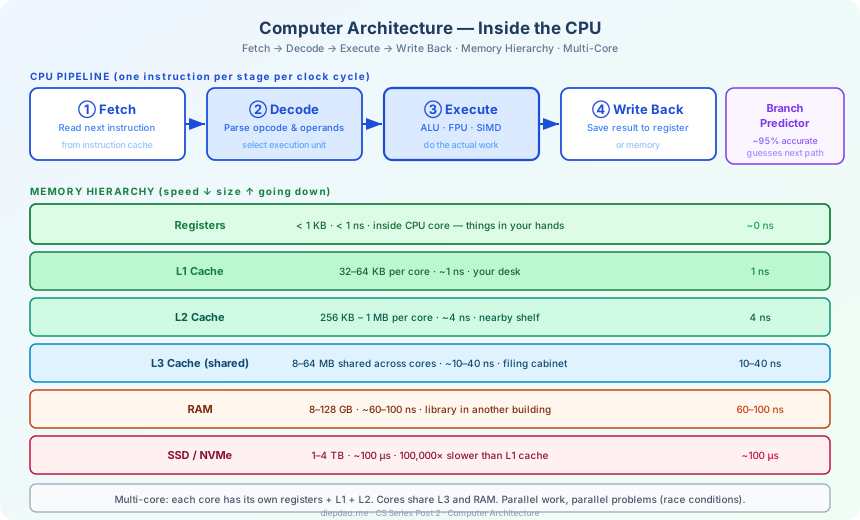
The Big Picture
╔══════════════════════════════════════════════════════════════════════════════╗
║                      Inside a Modern CPU                                      ║
╠══════════════════════════════════════════════════════════════════════════════╣
║  ┌─────────────────────────────────────────────────────────────────────┐      ║
║  │                        CPU Core                                     │      ║
║  │                                                                     │      ║
║  │  ┌──────────┐  ┌──────────┐  ┌──────────┐  ┌──────────────────┐   │        ║
║  │  │  Fetch   │→ │  Decode  │→ │ Execute  │→ │   Write Back     │   │        ║
║  │  │          │  │          │  │          │  │                  │   │        ║
║  │  │ get next │  │ what does│  │  do the  │  │ save the result  │   │        ║
║  │  │ instr.   │  │ it mean? │  │  work    │  │ to register/mem  │   │        ║
║  │  └──────────┘  └──────────┘  └──────────┘  └──────────────────┘   │        ║
║  │                                                                     │      ║
║  │  ┌──────────────────────┐  ┌──────────────────────────────────┐    │       ║
║  │  │   Branch Predictor   │  │        ALU / FPU / SIMD          │    │       ║
║  │  │  guesses if/else     │  │  integer · float · vector math   │    │       ║
║  │  └──────────────────────┘  └──────────────────────────────────┘    │       ║
║  │                                                                     │      ║
║  │  ┌──────────────────────────────────────────────────────────────┐  │       ║
║  │  │  Registers  (< 1 KB, < 1 ns)  — things currently in use     │  │        ║
║  │  └──────────────────────────────────────────────────────────────┘  │       ║
║  └─────────────────────────────────────────────────────────────────────┘      ║
╠══════════════════════════════════════════════════════════════════════════════╣
║  Memory Hierarchy (speed decreases, size increases going down)                ║
║                                                                               ║
║  L1 Cache   32–64 KB    ~1 ns    ← per core, closest to execution             ║
║  L2 Cache   256 KB–1 MB ~4 ns    ← per core                                   ║
║  L3 Cache   8–64 MB     ~10 ns   ← shared across cores                        ║
║  RAM        8–128 GB    ~60 ns   ← your computer's main memory                ║
║  SSD        1–4 TB      ~100 µs  ← 100,000× slower than L1 cache              ║
╠══════════════════════════════════════════════════════════════════════════════╣
║  Multiple Cores                                                               ║
║                                                                               ║
║  Core 0 │ Core 1 │ Core 2 │ Core 3  ← each runs independently                 ║
║  ────────┼────────┼────────┼────────                                          ║
║              Shared L3 Cache                                                  ║
║              Shared RAM                                                       ║
╚══════════════════════════════════════════════════════════════════════════════╝
1. What a CPU Actually Does
A CPU is a chip the size of a postage stamp that runs instructions — tiny commands like “add these two numbers”, “compare these values”, “jump to this memory address”.
Your Python script, your game, your browser — they all get translated into millions of these simple instructions before the CPU runs them.
A typical instruction looks like this (in human-readable form):
ADD  R1, R2, R3     # R1 = R2 + R3
CMP  R1, 100        # compare R1 with 100
JGT  loop_start     # if R1 > 100, jump to loop_start
MOV  R4, [0x1000]   # load value from memory address 0x1000 into R4
The CPU executes billions of these per second.
2. The Fetch-Decode-Execute Cycle
Every CPU, from the cheapest microcontroller to the fastest server chip, follows the same basic loop:
┌─────────────────────────────────────────────────────────┐
│                  The CPU Loop                           │
│                                                         │
│   1. FETCH   → read the next instruction from memory   │
│   2. DECODE  → figure out what the instruction means   │
│   3. EXECUTE → do the actual work (add, compare, jump) │
│   4. WRITE   → save the result back                    │
│                                                         │
│   Repeat. Billions of times per second.                 │
└─────────────────────────────────────────────────────────┘
Analogy: Imagine you’re following a recipe.
- Fetch: read step 5 from the page
- Decode: understand “whisk the eggs”
- Execute: actually whisk
- Write: the eggs are now whisked (result saved)
Simple enough. But modern CPUs do something much cleverer.
3. Pipelining — The Assembly Line
A single instruction takes several steps (fetch, decode, execute, write). Early CPUs waited for one instruction to fully finish before starting the next. That’s slow.
Modern CPUs use pipelining: while step 1 is executing, step 2 is decoding, step 3 is fetching — like an assembly line in a factory.
Time:        1    2    3    4    5    6    7
─────────────────────────────────────────────
Instruction 1: F  → D  → E  → W
Instruction 2:      F  → D  → E  → W
Instruction 3:           F  → D  → E  → W
Instruction 4:                F  → D  → E  → W

F=Fetch  D=Decode  E=Execute  W=Write
Without pipelining: 4 instructions × 4 steps = 16 cycles. With pipelining: 4 instructions finish in 7 cycles.
Modern CPUs have 10–20 pipeline stages. At 3 GHz, each stage takes about 0.3 nanoseconds.
4. Branch Prediction — Guessing the Future
Pipelining has a problem: what if the instruction you’re pre-fetching depends on a condition that hasn’t been calculated yet?
if score > 100:
    give_bonus()
else:
    try_again()
While the CPU is executing the score > 100 comparison, it’s already trying to fetch the next instruction. But which branch — give_bonus() or try_again()? It doesn’t know yet!
Branch prediction is the CPU’s educated guess. Modern CPUs track the history of every branch and predict with ~95% accuracy.
- Prediction correct: no slowdown, pipeline keeps flowing
- Prediction wrong: must flush the pipeline and start over — ~15 cycle penalty
This is why sorting data before processing can make code faster: sorted data has predictable patterns, so the branch predictor gets it right almost every time.
5. Out-of-Order Execution
Even within a single program, instructions don’t have to run in the order you wrote them — as long as the results are the same.
A = load from memory    # takes 60 ns (slow!)
B = 5 + 3              # only needs registers (0.3 ns)
C = A + B              # depends on A, must wait
A simple CPU would stall waiting for A. A smart CPU executes B while waiting for A to load. It finishes faster even though the order changed.
Modern CPUs can hold 200–400 in-flight instructions, reordering them on the fly to keep all execution units busy.
6. The Memory Hierarchy — Why Location Matters
The CPU can calculate at incredible speed. The problem is waiting for data. Memory access times differ enormously:
| Level | Size | Speed | Analogy |
|---|---|---|---|
| Registers | < 1 KB | < 1 ns | Things in your hands |
| L1 Cache | 32–64 KB | ~1 ns | Things on your desk |
| L2 Cache | 256 KB–1 MB | ~4 ns | Shelf next to you |
| L3 Cache | 8–64 MB | ~10–40 ns | Filing cabinet across the room |
| RAM | 8–128 GB | ~60 ns | Library in another building |
| SSD | 1–4 TB | ~100 µs | Library in another city |
| HDD | 1–20 TB | ~10 ms | Library on another planet |
L1 cache is about 60× faster than RAM. SSD is 100,000× slower than L1 cache.
This is why data locality — keeping data close together in memory — matters so much:
# SLOW: jumps randomly through memory (many cache misses)
for i in range(1000):
    total += matrix[random_row[i]][random_col[i]]

# FAST: reads memory in order (hits cache almost every time)
for row in matrix:
    for value in row:
        total += value
Both loops do the same math. The second can be 10–100× faster just because it reads memory in order.
How Caching Works
When you access memory address X, the CPU doesn’t just fetch X. It fetches a whole cache line — typically 64 bytes around X. If your next access is close to X, it’s already in cache (a cache hit). If not, it must fetch again (a cache miss).
Cache hit:   data already in L1/L2/L3   →  lightning fast
Cache miss:  must go to RAM or SSD      →  very slow stall
7. Registers — The CPU’s Workspace
Registers are tiny storage locations inside the CPU itself — the fastest memory that exists. A modern 64-bit CPU has a few dozen general-purpose registers, each 8 bytes wide.
Register R1:  00000000 00000000 00000000 00000101  (value = 5)
Register R2:  00000000 00000000 00000000 00000011  (value = 3)
              ↓  ADD R3, R1, R2
Register R3:  00000000 00000000 00000000 00001000  (value = 8)
Everything the CPU computes must pass through registers. When your code has too many variables at once, the compiler “spills” some to memory — which is much slower.
8. Multiple Cores — Parallel Work
One core doing one instruction at a time is fast. But what about doing two things at once?
Modern CPUs have multiple cores — 4, 8, 16, even 128 on server chips. Each core has its own registers, L1, and L2 cache. They share L3 cache and RAM.
Core 0: running your Chrome tab
Core 1: running your music player
Core 2: running a background virus scan
Core 3: idle (saving power)
A program must be written to use multiple cores — it doesn’t happen automatically. Threads are how a single program splits work across cores.
But multiple cores sharing memory creates a new problem: if Core 0 and Core 1 both try to update the same variable at the same time, the result is unpredictable. This is a race condition — a topic we’ll explore deeply in the Operating Systems post.
9. The Instruction Set — What a CPU “Speaks”
Every CPU has an instruction set architecture (ISA) — the set of instructions it understands.
| ISA | Used by | Notes |
|---|---|---|
| x86-64 | Intel, AMD desktop/server CPUs | Most PCs and servers |
| ARM | Apple M-series, phones, tablets | Power-efficient, now very fast |
| RISC-V | Embedded systems, research | Open standard, growing fast |
Software compiled for x86-64 won’t run on ARM directly — it’s a different language. This is why Apple had to develop a translation layer (Rosetta) when they switched Macs from Intel to their own ARM chips.
10. Special Execution Units
The main CPU isn’t the only compute unit on the chip:
ALU (Arithmetic Logic Unit): integer math, comparisons, bitwise operations.
FPU (Floating-Point Unit): decimal math (the kind used in games, scientific computing, ML). Separate hardware because floating-point operations are more complex.
SIMD Units (Single Instruction, Multiple Data): apply one instruction to multiple values at once.
Normal (scalar):  add R1, R2  →  1 addition
SIMD (AVX-256):   VADD YMM0, YMM1  →  4 additions simultaneously
Video codecs, image filters, and ML inference all use SIMD heavily. It’s like having 4–16 extra calculators working in parallel.
GPU (Graphics Processing Unit): technically a separate chip, but works alongside the CPU. A GPU has thousands of tiny cores — slower than CPU cores, but great for doing the same thing to millions of values at once (like applying a filter to every pixel in an image).
How It All Fits Together
When you run a Python function like sum([1, 2, 3, 4, 5]):
- The Python interpreter translates it into machine instructions
- The CPU fetches the first instruction from memory
- The branch predictor starts guessing what comes next
- The out-of-order engine lines up instructions to keep all units busy
- The memory hierarchy tries to keep data in L1 cache
- SIMD units crunch multiple numbers at once
- Results flow back through write-back into registers
All of this happens in a few microseconds.
Your Python code
      ↓
Python bytecode (intermediate language)
      ↓
Machine instructions (x86-64 / ARM)
      ↓
CPU pipeline: Fetch → Decode → Execute → Write
      ↓
Result in register → written to memory → returned to Python
The next time you wonder why one loop runs 10× faster than another, the answer is almost always in this pipeline: a cache miss, a branch misprediction, or a missed chance to use SIMD.
In the next post, we’ll go up one layer: the Operating System — the software that manages the CPU, memory, and all running programs at once.
Back to the series: Welcome to the Computer Science Series
Comments