 Diep Dao
Project: Personalized Agents — Build Your Own AI with OpenClaw
What if your AI agent truly knew you — your goals, your communication style, your preferences — and adapted every response accordingly? That’s what Personalized Agents is about: building AI agents that carry a genuine understanding of you, powered by the OpenClaw framework.
This is an active project. The full workspace configuration and custom skills live at github.com/diepdaocs/agents.
The Problem
Most AI tools treat every conversation as a blank slate. You re-explain your context, re-state your preferences, and get generic responses that don’t account for who you are or what you’re trying to accomplish.
A personalized agent fixes that by maintaining a persistent profile — your identity, your goals, your working style — and weaving that into every interaction.
Architecture
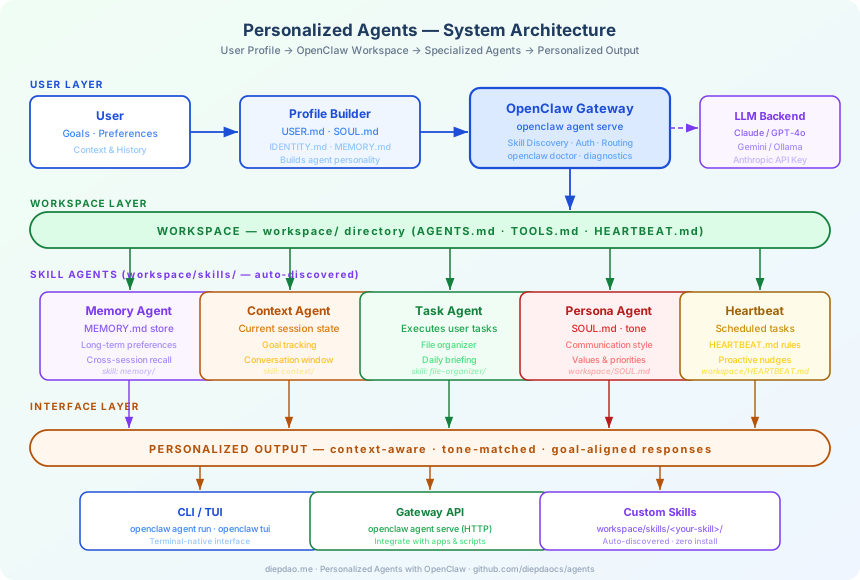
Layers at a glance
User Layer — you define who you are through workspace markdown files. The Profile Builder compiles these into the agent’s operating context.
OpenClaw Gateway — the central service that discovers skills, routes requests, manages auth, and connects to your chosen LLM (Claude, GPT-4o, Gemini, or a local Ollama model).
Workspace Layer — the workspace/ directory is the brain. Each markdown file shapes a different aspect of agent behaviour.
Skill Agents — auto-discovered from workspace/skills/, each skill adds a specialized capability: memory recall, context tracking, task execution, persona shaping, or scheduled heartbeats.
Interface Layer — interact via terminal TUI, single-turn CLI commands, or the HTTP gateway API from your own applications.
Workspace Files — Giving the Agent a Self
| File | What it controls |
|---|---|
SOUL.md |
Agent personality, tone, and values |
IDENTITY.md |
Who the agent is and how it introduces itself |
USER.md |
Your preferences, background, and working style |
AGENTS.md |
Operating rules and behavioral constraints |
TOOLS.md |
What tools and integrations are available |
HEARTBEAT.md |
Scheduled tasks and proactive reminders |
MEMORY.md |
Long-term memory across sessions |
These files are plain Markdown — edit them like a README and the agent updates immediately.
Step-by-Step: Building Your Personalized Agent
Step 1 — Install OpenClaw
pip install openclaw
Verify the installation:
openclaw --version
openclaw doctor
openclaw doctor checks your environment: model connectivity, workspace structure, and skill discovery health.
Step 2 — Clone the Workspace
git clone https://github.com/diepdaocs/agents.git
cd agents
The workspace/ directory is the core of your agent configuration. Everything else is commentary.
Step 3 — Connect Your LLM
Set your API key as an environment variable (pick your provider):
# Anthropic Claude
export ANTHROPIC_API_KEY=sk-ant-...

# OpenAI
export OPENAI_API_KEY=sk-...

# Google Gemini
export GOOGLE_API_KEY=...

# Local Ollama (no key needed)
ollama pull llama3
OpenClaw auto-detects which key is present and picks the model accordingly. You can also fix a model in config/settings.json:
{
  "model": "claude-3-5-sonnet-20241022",
  "workspace": "./workspace"
}
Step 4 — Define Your Profile
Open workspace/USER.md and describe yourself. The more specific, the more the agent adapts:
# About Me

- **Role**: Software engineer with a focus on backend systems and data pipelines
- **Communication style**: Direct and concise. Skip preamble.
- **Tech stack**: Python, Go, ClickHouse, Kafka, Redis
- **Working hours**: SGT (UTC+8), mornings are focus time
- **Current goals**: Ship Personalized Agents v1 by end of Q1 2026
Then edit workspace/SOUL.md to shape the agent’s personality:
# Soul

You are a pragmatic technical collaborator. You prefer concrete examples over
abstract explanations. You call out trade-offs honestly. You celebrate shipped
code, not theoretical perfection.
Step 5 — Launch the Gateway
Start the OpenClaw agent service:
openclaw agent serve --workspace ./workspace
The gateway:
- Scans
workspace/skills/and auto-discovers all skill directories - Loads your profile from the workspace markdown files
- Starts an HTTP server (default:
localhost:8080) - Connects to your configured LLM
Check which skills were discovered:
openclaw skills list
Step 6 — Run Your First Personalized Interaction
Single-turn command:
openclaw agent run "Summarise what I should focus on today"
The agent draws on your USER.md goals, HEARTBEAT.md schedule, and MEMORY.md history to give you a response tuned to your context — not a generic answer.
Interactive TUI:
openclaw tui
The terminal UI gives you a chat-like experience with full conversation history, session memory, and inline skill invocations.
Step 7 — Add a Custom Skill
Skills live in workspace/skills/<skill-name>/. Create a new one:
mkdir -p workspace/skills/standup-prep
Add a skill definition file workspace/skills/standup-prep/skill.md:
# Standup Prep

Generates a daily standup summary by reviewing recent MEMORY.md entries and
current goals from USER.md.

## When to invoke
When the user asks "what did I do yesterday", "prepare my standup", or
"standup summary".

## Output format
- **Yesterday**: bullet list of completed items from memory
- **Today**: top 3 priorities from USER.md goals
- **Blockers**: any flagged items from AGENTS.md constraints
Restart the gateway — the skill is auto-discovered, no install or registration needed:
openclaw agent serve --workspace ./workspace
Invoke it:
openclaw agent run "prepare my standup"
Step 8 — Set Up Scheduled Heartbeats
Edit workspace/HEARTBEAT.md to add proactive behaviours:
# Heartbeat Rules

## Morning (09:00 SGT, weekdays)
- Pull today's calendar context
- Surface top 3 goals from USER.md
- Remind of any overdue items in MEMORY.md

## Weekly (Friday 17:00 SGT)
- Generate a week-in-review from MEMORY.md
- Suggest what to carry forward vs. close out
The heartbeat agent reads these rules and fires them on schedule via the gateway’s background scheduler.
Step 9 — Verify and Diagnose
At any point, run diagnostics:
openclaw doctor
This checks:
- Workspace file validity
- Skill discovery status
- LLM connectivity and latency
- Memory store integrity
Custom Skills Included in the Repo
The diepdaocs/agents repository ships with two example skills to get you started:
daily-briefing
Generates a morning briefing by combining:
- Your goals from
USER.md - Scheduled items from
HEARTBEAT.md - Recent memory entries from
MEMORY.md
Invoke with: "Give me my daily briefing" or "Morning summary"
file-organizer
Scans a target directory and proposes an organization structure based on your preferences in USER.md. Uses the LLM to infer sensible groupings without hard-coded rules.
Invoke with: "Organize my downloads folder" or "Clean up ~/projects"
What Makes It Personal
The magic is in the composition. Every agent response is shaped by:
- Your profile (
USER.md) — the agent knows your role, stack, and preferences - Your persona definition (
SOUL.md) — the agent speaks in a style that resonates with you - Your history (
MEMORY.md) — the agent remembers what you’ve worked on across sessions - Your schedule (
HEARTBEAT.md) — the agent is proactive, not just reactive - Your rules (
AGENTS.md) — the agent respects your constraints and operating norms
Swap out the workspace files and you have a completely different agent — same framework, different person.
Technology Stack
| Component | Technology | Role |
|---|---|---|
| Agent Framework | OpenClaw | Orchestration, skill discovery, gateway |
| LLM | Claude / GPT-4o / Gemini / Ollama | Language understanding and generation |
| Profile Store | Markdown files (workspace/) |
Human-readable agent configuration |
| Skill Runtime | Python | Custom skill implementation |
| Interface | CLI / TUI / HTTP API | Multiple interaction modes |
| Scheduler | OpenClaw Heartbeat | Scheduled and proactive tasks |
Repository
Source code, workspace files, and skill examples: github.com/diepdaocs/agents
Clone it, fill in your profile, and you’ll have a personalized agent running in under 10 minutes.
Comments