 Diep Dao
Project: @diepdao/aicli — API Docs CLI for AI Copilots
A global npm CLI that gives AI copilots (GitHub Copilot, Claude, Cursor) instant access to the latest API documentation for any open-source tool — Kafka, Redis, ClickHouse, Elasticsearch, Cassandra, and more — without hallucination, without stale training data.
Inspired by @aisuite/chub, @diepdao/aicli follows the same philosophy: fetch live, accurate docs on demand, and hand them to your AI agent in a structured format it can immediately use.
GitHub: diepdaocs/aicli · npm: @diepdao/aicli
The Problem
AI copilots are trained on snapshots. By the time you’re using them, their knowledge of kafka-js@2.x, ClickHouse HTTP API v24, or redis@5 may already be outdated. The copilot confidently generates code that calls APIs that no longer exist, with parameters that have been renamed, against endpoints that have moved.
The fix isn’t a bigger model — it’s retrieval at prompt time.
What aicli Does
npm install -g @diepdao/aicli

aicli search kafka                  # search documentation entries for kafka
aicli search kafka/producer --fetch # fetch full producer docs
aicli search redis --json           # output results as JSON
aicli guide                         # show usage guide and available topics
The copilot runs these commands, gets the current docs as structured text, and uses them to generate accurate code — no guessing, no hallucination.
Supported Libraries
| Library | Category |
|---|---|
| Apache Kafka | Event streaming |
| Redis | In-memory data store |
| ClickHouse | OLAP database |
| Java SE 21 | Standard library |
| Google Guava | Core utilities |
| Apache Cassandra | NoSQL database |
| Elasticsearch | Search engine |
| RabbitMQ | Message broker |
How It Works
Architecture
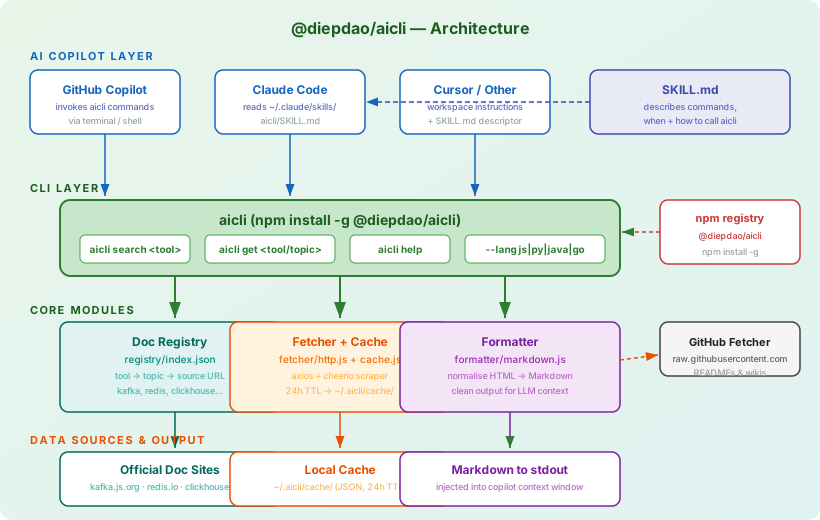
The CLI has three layers:
- Registry — an index of known tools and their doc topics
- Fetcher — pulls documentation from official sources (GitHub, official docs sites), parses and normalises it to Markdown via
turndown - Formatter — outputs clean Markdown to stdout so it fits directly into a copilot context window
Project Structure
aicli/
├── src/
│   ├── commands/
│   │   ├── search.ts         # aicli search <query> [--fetch] [--json]
│   │   └── guide.ts          # aicli guide
│   ├── registry/
│   │   └── index.ts          # tool → topics → source URL mapping
│   ├── fetcher/
│   │   ├── http.ts           # HTTP doc fetcher (cheerio + turndown)
│   │   └── cache.ts          # local TTL cache (~/.aicli/cache/)
│   └── index.ts              # CLI entry point (commander setup)
├── skills/                   # Claude / Copilot skill descriptors
├── dist/                     # compiled output (TypeScript → JS)
├── package.json
└── README.md
Building It
1. Scaffold the package
mkdir aicli && cd aicli
npm init -y
npm install commander cheerio chalk turndown
npm install --save-dev typescript @types/node jest
package.json key fields:
{
  "name": "@diepdao/aicli",
  "version": "1.0.2",
  "bin": {
    "aicli": "./dist/index.js"
  },
  "files": ["dist", "skills"],
  "engines": { "node": ">=18.0.0" }
}
2. CLI entry point
// src/index.ts
import { program } from 'commander';
import { searchCommand } from './commands/search.js';
import { guideCommand }  from './commands/guide.js';

program
  .name('aicli')
  .description('Fetch latest API docs for open-source tools — built for AI copilots')
  .version('1.0.2');

program
  .command('search [query]')
  .description('Search documentation entries')
  .option('--fetch', 'retrieve and display full documentation')
  .option('--json', 'output results as JSON')
  .action(searchCommand);

program
  .command('guide')
  .description('Show usage guide and available topics')
  .action(guideCommand);

program.parse();
3. Doc registry
// src/registry/index.ts
export const registry: Record<string, Record<string, string>> = {
  kafka: {
    producer:  'https://kafka.js.org/docs/producing',
    consumer:  'https://kafka.js.org/docs/consuming',
    admin:     'https://kafka.js.org/docs/admin',
  },
  redis: {
    commands:  'https://redis.io/commands/',
    streams:   'https://redis.io/docs/data-types/streams/',
    pubsub:    'https://redis.io/docs/manual/pubsub/',
  },
  clickhouse: {
    'http-api': 'https://clickhouse.com/docs/en/interfaces/http',
    sql:        'https://clickhouse.com/docs/en/sql-reference',
    'client-js': 'https://clickhouse.com/docs/en/integrations/javascript',
  },
  elasticsearch: {
    'search-api': 'https://www.elastic.co/guide/en/elasticsearch/reference/current/search-search.html',
    'index-api':  'https://www.elastic.co/guide/en/elasticsearch/reference/current/indices-create-index.html',
  },
  cassandra: {
    'cql':      'https://cassandra.apache.org/doc/latest/cassandra/cql/',
    'drivers':  'https://cassandra.apache.org/doc/latest/cassandra/getting_started/drivers.html',
  },
  rabbitmq: {
    'tutorials': 'https://www.rabbitmq.com/tutorials',
    'consumers': 'https://www.rabbitmq.com/docs/consumers',
  },
  // ... java-se-21, guava
};
4. Fetcher with HTML-to-Markdown conversion
// src/fetcher/http.ts
import axios from 'axios';
import * as cheerio from 'cheerio';
import TurndownService from 'turndown';
import { readCache, writeCache } from './cache.js';

const td = new TurndownService();

export async function fetchDocs(url: string, { noCache = false } = {}) {
  if (!noCache) {
    const cached = readCache(url);
    if (cached) return cached;
  }

  const { data } = await axios.get(url, {
    headers: { 'User-Agent': 'aicli/1.0 (AI copilot doc fetcher)' },
    timeout: 10_000,
  });

  const $ = cheerio.load(data);
  $('nav, footer, header, script, style, .sidebar').remove();
  const html = $('main, article, .content, body').first().html() ?? '';
  const markdown = td.turndown(html);

  writeCache(url, markdown);
  return markdown;
}
SKILL.md — Integrating with Claude and Copilot
This file tells the AI agent how and when to use aicli. Place it at ~/.claude/skills/aicli/SKILL.md for Claude Code, or reference it in your Copilot workspace instructions.
# aicli — API Documentation Fetcher

## When to use
Use `aicli` whenever you need current API documentation for an open-source
tool. Prefer this over relying on training knowledge for:
- Library APIs that change between versions (Kafka, Redis, ClickHouse, etc.)
- HTTP interfaces and SDK methods
- Configuration options and connection parameters

## Install
npm install -g @diepdao/aicli

## Commands

### Search documentation
aicli search <query>
# Example: aicli search kafka
# Example: aicli search kafka/producer --fetch
# Example: aicli search redis --json

### General help
aicli guide

## Workflow
1. Run `aicli search <tool>` to find available doc topics
2. Run `aicli search <tool>/<topic> --fetch` to retrieve full docs
3. Use the fetched docs as context to write accurate, up-to-date code
4. Docs are cached locally — reliable even in low-connectivity environments
Publishing to npm
The package is live on npm:
npm install -g @diepdao/aicli
aicli guide
aicli search kafka
aicli search kafka/producer --fetch
Development workflow
# Build TypeScript
npm run build

# Test locally
npm link
aicli guide

# Publish
npm login
npm publish --access public
CI with GitHub Actions
# .github/workflows/publish.yml
name: Publish to npm

on:
  push:
    tags: ['v*']

jobs:
  publish:
    runs-on: ubuntu-latest
    steps:
      - uses: actions/checkout@v4
      - uses: actions/setup-node@v4
        with:
          node-version: 20
          registry-url: 'https://registry.npmjs.org'
      - run: npm ci
      - run: npm run build
      - run: npm publish --access public
        env:
          NODE_AUTH_TOKEN: $
Tag a release to trigger it:
git tag v1.0.2 && git push --tags
Extending the Registry
Adding a new library is a one-entry registry edit:
"mongodb": {
  "crud":       "https://www.mongodb.com/docs/drivers/node/current/fundamentals/crud/",
  "aggregation":"https://www.mongodb.com/docs/manual/aggregation/",
}
For tools whose docs live on GitHub, point directly at the raw README or use the GitHub raw API:
https://raw.githubusercontent.com/<owner>/<repo>/HEAD/README.md
Comparison: aicli vs @aisuite/chub
| Feature | @aisuite/chub |
@diepdao/aicli |
|---|---|---|
| Focus | OpenAI, commercial AI APIs | Open-source infra (Kafka, Redis, ClickHouse…) |
| Language | JavaScript | TypeScript |
| Output format | Text | Markdown (via turndown) |
| Cache | None mentioned | Local TTL cache |
| SKILL.md | Supported | Supported |
| Registry | Curated AI APIs | Extensible registry |
Both tools follow the same core idea: pull docs at runtime, not from training weights.
What’s Next
- Add more libraries: PostgreSQL, MongoDB, gRPC, Spring Boot
- Support versioned docs (
aicli search kafka@2.x) - MCP (Model Context Protocol) server mode — expose
aiclias an MCP tool so Claude Desktop can call it directly - Community-contributed registry entries via pull requests
Comments